|
| | __init__ (self) |
| |
| vtkMRMLScriptedModuleNode | CreateVRNode (cls, volumeNode, scene) |
| |
| | GetVisibility (cls, node) |
| |
| | GetVRNode (cls, vtkMRMLVolumeNode volumeNode, vtkMRMLScene scene) |
| |
| bool | GetVRNodeVisibility (cls, volumeNode, scene) |
| |
| | IsPipelineNode (cls, node) |
| |
| None | OnRendererAdded (self, vtkRenderer renderer) |
| |
| None | OnRendererRemoved (self, vtkRenderer renderer) |
| |
| | OnUpdate (self, obj, eventId, callData) |
| |
| | RemoveVRNode (cls, vtkMRMLVolumeNode volumeNode, vtkMRMLScene scene) |
| |
| | SetDisplayNode (self, node) |
| |
| | SetVRNodeVisible (cls, node, bool isVisible) |
| |
| vtkMRMLLayerDMScriptedPipeline|None | TryCreatePipeline (cls, vtkMRMLAbstractViewNode viewNode, vtkMRMLNode node) |
| |
| | UpdateFromMRML (self) |
| |
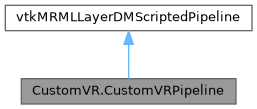
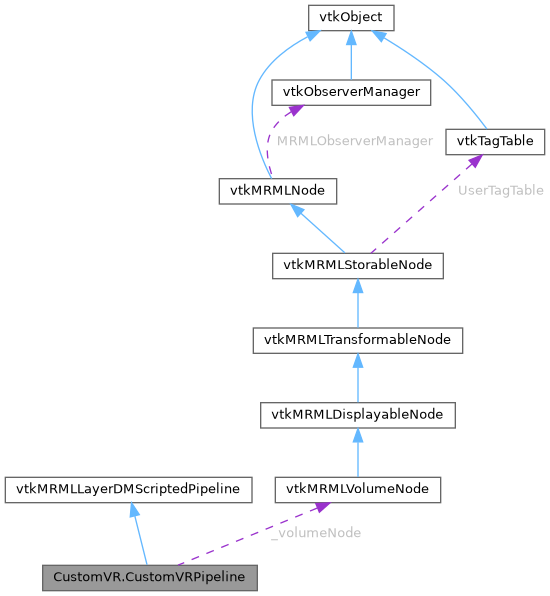
Custom VR pipeline
Definition at line 115 of file CustomVR.py.
◆ __init__()
| CustomVR.CustomVRPipeline.__init__ |
( |
| self | ) |
|
In the pipeline creation, we create the different VTK objects.
Here, the mapper properties are static, but they could be set in the data node and be reactive.
Definition at line 118 of file CustomVR.py.
◆ _GetClassName()
| str CustomVR.CustomVRPipeline._GetClassName |
( |
| cls | ) |
|
|
protected |
Convenience method to get the name of the current class.
This method will return the actual class name for inheriting classes.
Definition at line 210 of file CustomVR.py.
◆ _GetVolumeNode()
Convenience method to get the volume node associated with the pipeline's data node.

Here, we use the following APIs:
    - GetScene: This will return the scene on which the pipeline is attached
    - GetDisplayNode: This will return the pipeline's data node instance
Definition at line 363 of file CustomVR.py.
◆ _GetVolumeNodeID()
| CustomVR.CustomVRPipeline._GetVolumeNodeID |
( |
| cls, |
|
|
| node ) |
|
protected |
Convenience method to get the volume node ID attached to the input MRML node.
Definition at line 428 of file CustomVR.py.
◆ _GetVolumeTransformMatrixToWorld()
| CustomVR.CustomVRPipeline._GetVolumeTransformMatrixToWorld |
( |
| self | ) |
|
|
protected |
Converts a volume's IJK coordinates to World coordinates.

:return: the IJK to World matrix, or None if there is no volume node.
Definition at line 303 of file CustomVR.py.
◆ _IsVolumeVisible()
| bool CustomVR.CustomVRPipeline._IsVolumeVisible |
( |
| self | ) |
|
|
protected |
Convenience method to check if the pipeline's volume node is visible.
Definition at line 356 of file CustomVR.py.
◆ _ObserveVolumeImageData()
| CustomVR.CustomVRPipeline._ObserveVolumeImageData |
( |
| self | ) |
|
|
protected |
◆ _ObserveVolumeNode()
| CustomVR.CustomVRPipeline._ObserveVolumeNode |
( |
| self | ) |
|
|
protected |
Convenience method to update the volume and the volume's transform node observers.

Here, we use the UpdateObservation method:
    - UpdateObservation(vtkObject* prevObj, vtkObject* obj, const std::vector<unsigned long>& events) -> bool
    - UpdateObservation(vtkObject* prevObj, vtkObject* obj, unsigned long event = vtkCommand::ModifiedEvent) -> bool

This method should be used to add an observer on VTK object.
By default, the object's modified event will be observed.
The method also supports lists of events.

On modify event, the class's self.OnUpdate method will be called.

Warning: prevObj is not mutated by this call. To update the pointer, a manual set is required after update.

See also: self.OnUpdate
Definition at line 373 of file CustomVR.py.
◆ _ObserveVolumeTransformNode()
| CustomVR.CustomVRPipeline._ObserveVolumeTransformNode |
( |
| self | ) |
|
|
protected |
Convenience method to update the volume's transform node observer.

Note: Here we explicitly observe the transform modified event as modifying the transform doesn't trigger
its modified event.

See also: self._ObserveVolumeNode
Definition at line 399 of file CustomVR.py.
◆ _UpdateActorVisibility()
| CustomVR.CustomVRPipeline._UpdateActorVisibility |
( |
| self | ) |
|
|
protected |
◆ _UpdateMapperConnection()
| CustomVR.CustomVRPipeline._UpdateMapperConnection |
( |
| self | ) |
|
|
protected |
◆ CreateVRNode()
◆ GetVisibility()
| CustomVR.CustomVRPipeline.GetVisibility |
( |
| cls, |
|
|
| node ) |
◆ GetVRNode()
◆ GetVRNodeVisibility()
| bool CustomVR.CustomVRPipeline.GetVRNodeVisibility |
( |
| cls, |
|
|
| volumeNode, |
|
|
| scene ) |
◆ IsPipelineNode()
| CustomVR.CustomVRPipeline.IsPipelineNode |
( |
| cls, |
|
|
| node ) |
Returns True if the input vktMRMLNode is a scripted node and has the pipeline type attribute matching the
current pipeline class.
Definition at line 188 of file CustomVR.py.
◆ OnRendererAdded()
| None CustomVR.CustomVRPipeline.OnRendererAdded |
( |
| self, |
|
|
vtkRenderer | renderer ) |
Triggered when the pipeline is displayed on a new renderer.
default behavior: does nothing.

Here, we add our actor to the input renderer.
If the pipeline renderer has changed, the pipeline's UpdateDisplay method will be triggered and in turn its
UpdateFromMRML method will be triggered.

Since we don't control the actual renderer used by the pipeline, this should be used systematically.
See also: self.GetRenderer()
Definition at line 217 of file CustomVR.py.
◆ OnRendererRemoved()
| None CustomVR.CustomVRPipeline.OnRendererRemoved |
( |
| self, |
|
|
vtkRenderer | renderer ) |
Triggered when the pipeline is removed from its previous renderer.
default behavior: does nothing.

Here, we add our actor to the input renderer.
If the pipeline renderer has changed, the pipeline's UpdateDisplay method will be triggered and in turn its
UpdateFromMRML method will be triggered.

Since we don't control the actual renderer used by the pipeline, this should be used systematically.
See also: self.GetRenderer()
Definition at line 234 of file CustomVR.py.
◆ OnUpdate()
| CustomVR.CustomVRPipeline.OnUpdate |
( |
| self, |
|
|
| obj, |
|
|
| eventId, |
|
|
| callData ) |
Observer update callback.
Triggered when any object & events observed using UpdateObservation is triggered.

:param obj: vtkObject instance which triggered the callback
:param eventId: Event id which triggered the callback
:param callData: Optional observer call data. Use self.CastCallData(callData, vtkType) to convert to Python
Definition at line 265 of file CustomVR.py.
◆ RemoveVRNode()
◆ SetDisplayNode()
| CustomVR.CustomVRPipeline.SetDisplayNode |
( |
| self, |
|
|
| node ) |
Set the display node for the pipeline has changed (initialization).
default behavior: Stored and display node is observed for vtkCommand::ModifiedEvent.
See also: self.UpdateObservation(prevObj, newObj, eventIds)
See also: self.OnUpdate(obj, eventId, callData)

:param node: The new instance of display node for the pipeline
Definition at line 281 of file CustomVR.py.
◆ SetVRNodeVisible()
| CustomVR.CustomVRPipeline.SetVRNodeVisible |
( |
| cls, |
|
|
| node, |
|
|
bool | isVisible ) |
◆ TryCreatePipeline()
Since we are creating pipelines for 3D views only, we check here if the view node is a ThreedView node and
if the node matches the current pipeline type (i.e. was created using the _CreatePipelineNode method).
Definition at line 196 of file CustomVR.py.
◆ UpdateFromMRML()
| CustomVR.CustomVRPipeline.UpdateFromMRML |
( |
| self | ) |
|
Triggered by self.UpdateDisplay() calls:
    - Called automatically at pipeline creation / add to the render window
    - Called automatically when switching renderer
Override to update the representation of the pipeline in the different views.

See also: self.RequestRender()
default behavior: does nothing.
Definition at line 251 of file CustomVR.py.
◆ _actor
| CustomVR.CustomVRPipeline._actor = vtkVolume() |
|
protected |
◆ _imageData
| CustomVR.CustomVRPipeline._imageData = None |
|
protected |
◆ _mapper
| CustomVR.CustomVRPipeline._mapper = vtkGPUVolumeRayCastMapper() |
|
protected |
◆ _volumeNode
| CustomVR.CustomVRPipeline._volumeNode = None |
|
protected |
◆ _volumeProperty
| CustomVR.CustomVRPipeline._volumeProperty = vtkVolumeProperty() |
|
protected |
◆ _volumeTransform
| CustomVR.CustomVRPipeline._volumeTransform = None |
|
protected |
The documentation for this class was generated from the following file:

 1.13.0